|
GCNextAI scripts
If you are lucky enough to have John Worsham's brilliant GCNextAI add on you can use it to
give better frame rate with a bit of scripting , If you have an enemy in a level and he just stands still until he attacks he doesn't look very convincing so you obviously have him animated , a few frames for him to cycle through as he stands guard , if he is going through these animation cycles when you are elsewhere it is a bit of a waste of resources , by using GCNextAI you can script him so that he only moves when you see him , below is one of my GCNextAI scripts which only animates the enemy when the player can see him directly .
STATE_COMMON: 64
_if_target_see_me 0 0
_do_stateswitch_STATE_HOSTILE 0 0
END_STATE:
STATE_HOSTILE: 64
_if_me_dist_target_> 400 0
_if_gtime2_> 512 0
_do_runto_target 0 0
_exit 0 0
_endif 0 0
_if_me_see_target 0 0
_do_turnto_target 0 0
_do_attack_target 0 0
_endif 0 0
END_STATE:
STATE_HURT: 64
_do_duck 0 0
END_STATE:
|
|
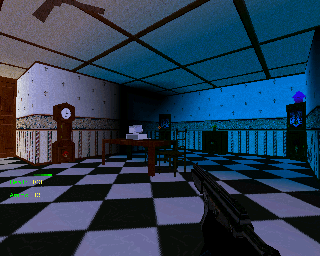
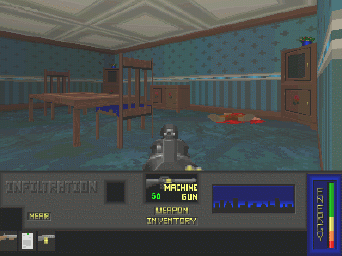
These screenshots are of the same room .
|
|
Improving framerate .
|
|
When I first started making the game I didn't give a lot of consideration to framerate as the games the
engine was capable of where not really taxing on an old graphics card and CPU , as you can see from the early screenshot above the graphics were low res and blocky to say the least and the enemies were sprites as opposed to 3D polygon models as they are now , the red blob on the floor in the old screenshot is a dead enemy .
To improve framerate those considerate guys at Pie have added a few features to help us out :-
When placing a wall or object in a level you have certain attributes you can set -
Don't draw backs :-
This does exactly what it says , when you are in a room you can only see one side of a wall so why
would you want the other side drawing ?
Floor to ceiling:-
If you are in a room with four walls and a ceiling that you can't see out of there is no need to have the
engine draw anything beyond the room , setting this attribute stops anything behind walls with the attribute set from being drawn , only use this attribute on solid walls.
Don't draw if far away:-
If you have objects or walls beyond the field of vision of the player there is no point drawing them so
this attribute tells the engine not to draw them until the player is within a certain distance .
Floor and Ceiling textures :-
Floors and ceilings are different to walls and objects as they are place in the game from the EFE ( Extra
Features Editor ) but as with the editor the guys at Pie have added features here too that will help frame rate .
In the game wide options there is an attribute you can set called cull floor/ceiling backsides , as you
only see floors from above as you look down on them and as you only see ceilings from below as you look up at them then there is no point drawing the other side , as yet I have not come across an instance where I have needed both side of either drawn .
Sectoring:-
By using this feature you can have whole sectors of a level undrawn whilst the player is in a different
sector , when you place floor panels you can assign sector numbers to them and all walls and objects that are on the floor panels are classed as being in the sector the floor they are on defines , so if you have a level sector that is on floor panels defined as sector 1 and you are in a sector that is on floor panels that are defined as sector 2 the whole of sector 1 is undrawn , if you had sector 1 and sector 2 right next to each other you would get a strange effect of one sector suddenly appearing and the other suddenly disappearing when you crossed from one sector to the other , to combat this walls and objects on floor panels defined as sector 0 are always drawn , so what you would do is make sure that sectors are conected by floor panels defined as sector 0 like in the map below . |
|
Bottom of page
|
|
Bottom of page
|